Veeam Backup & Replication: Versatile Protection for Modern IT Environments

Part 2 of the 4-Part 2025 BDR Series [Part 1]    [Part 2]    [Part 3]    [Part 4]

Alisanne Steele | Rabbit Hole Technology | blog | @RabbitHoleIT

In today’s increasingly hybrid IT environments, organizations need more than just a basic backup tool — they need flexibility, scalability, and the confidence to restore fast in any situation.

In Part 1 of our Backup & Disaster Recovery (BDR) Series, we covered Datto, a trusted appliance-based solution geared toward small and mid-sized businesses. Today, we shift gears to explore Veeam, a powerhouse in the world of software-defined data protection.


Who Is Veeam?

Founded in 2006, Veeam quickly emerged as a pioneer in virtual machine (VM) backup for VMware. Over the past two decades, it has grown into one of the most trusted names in backup and recovery, particularly for businesses operating in virtualized, hybrid, and multi-cloud environments.

With over 450,000 customers and consistent placement in the Gartner Magic Quadrant for Enterprise Backup, Veeam is widely used by IT teams who need control, customization, and enterprise-grade performance.


Core Capabilities of Veeam Backup & Replication

Veeam’s flagship platform — Veeam Backup & Replication — delivers fast, flexible, and reliable backup and recovery for virtual, physical, and cloud-based workloads.

Supported Platforms:

  • Virtual: VMware vSphere, Microsoft Hyper-V, Nutanix AHV
  • Cloud: AWS, Microsoft Azure, Google Cloud
  • SaaS: Microsoft 365 (email, OneDrive, SharePoint)
  • Physical: Windows and Linux servers, endpoints

Key Features Include:

  • Instant VM Recovery® – Restore VMs in seconds directly from backup
  • SureBackup® and SureReplica – Automated testing and verification of backups and replicas
  • Built-in Ransomware Protection – Includes support for immutable backups on hardened Linux repositories
  • Granular Recovery – Restore individual files, applications, and databases without full VM recovery
  • Veeam ONE™ – Advanced monitoring, reporting, and capacity planning

Strengths & Differentiators

What sets Veeam apart isn’t just its wide compatibility — it’s the depth of control and customization it offers to IT administrators and MSPs.

Why Customers Choose Veeam:

  • Platform-Agnostic Flexibility: Works across hybrid and multi-cloud environments without vendor lock-in
  • Automation & APIs: Extensive scripting capabilities using PowerShell and REST APIs
  • Strong Ecosystem: Integrates with virtually every major storage vendor, hypervisor, and cloud platform
  • Scalability: From small teams to enterprise data centers, Veeam grows with your infrastructure
  • MSP-Ready: Many managed service providers use Veeam under multi-tenant licensing models

Challenges & Considerations

While Veeam is a leader in backup software, it’s not a plug-and-play solution like some of its appliance-based competitors.

Points to Keep in Mind:

  • Complexity: Full deployment and optimization may require technical expertise or MSP support
  • Infrastructure Required: Veeam is software — you need to provide the storage, compute, and cloud resources
  • Cost Visibility: Licensing and capacity-based pricing can be difficult to estimate upfront without proper planning

Ideal Use Cases for Veeam

Veeam shines in environments where control, flexibility, and customization are critical.

  • Mid-sized to large enterprises with diverse workloads across on-prem and cloud
  • Organizations using VMware or Hyper-V as part of their core infrastructure
  • MSPs and IT departments looking to build tailored BDR strategies
  • Companies with Microsoft 365 data protection requirements

Final Thoughts

If Datto is the sleek, all-in-one appliance for small teams, Veeam is the high-performance engine room that powers enterprise-grade BDR across hybrid environments.
It’s trusted by global enterprises and IT professionals who need control, visibility, and speed when every second counts.

Coming up next in our 4-part series:
Acronis – Unified Cyber Protection in a Hybrid World — an integrated platform that brings together backup, disaster recovery, antivirus, and endpoint management in one unified interface.


Need Help Assesing BCDR Solutions?

Rabbit Hole Technology helps law firms, professional services, and small businesses stay protected, compliant, and connected. Whether you need a fully managed backup strategy or support designing your own BDR plan, we deliver tailored solutions that meet your risk tolerance and budget.

👉 Learn more at www.rabbithole.technology

📨 Follow us on:
X (Twitter) | LinkedIn | Facebook

Six Ways We Shield Your Business from Ransomware in 2025

Alisanne Steele | Rabbit Hole Technology | blog |@RabbitHoleIT

The Threat Landscape Has Evolved—So Have We

Your business is more connected than ever. You rely on cloud platforms, mobile devices, remote collaboration tools, and digital workflows to drive productivity. But with that connectivity comes a growing cyber threat: ransomware.

Cybercriminals are increasingly targeting small to mid-sized businesses—especially those without comprehensive protection. In 2024 alone, ransomware attacks cost businesses an estimated $20 billion globally, with average ransom demands exceeding $800,000.

And while ransomware remains a top threat, attackers are becoming faster, stealthier, and more persistent. That’s why we’ve built a sustainable, repeatable six-layer security strategy to protect your business from infection, data loss, and disruption.


🔍 Why Your Business Is a Target

  • 74% of organizations support or plan to support BYOD
  • Only 25% of laptops are backed up regularly
  • 60 million computers will fail this year
  • Ransomware spreads through phishing, software flaws, and unsecured devices

The rise of remote work and employee-owned devices opens new doors for attackers. Every endpoint, outdated app, or untrained user becomes a vulnerability.


🛡️ Our Six-Layered Approach to Ransomware Protection

We deploy a multi-layered defense strategy built to adapt to evolving threats. Our partnerships with Datto, Sophos, and KnowBe4 ensure industry-leading protection and training.


1. Patching & Vulnerability Management

We apply the latest security patches to operating systems and apps to close known vulnerabilities before attackers can exploit them.


2. Advanced Antivirus & Threat Detection

Real-time antivirus and threat detection systems monitor files and traffic across your network, blocking viruses, spyware, and suspicious activity.


3. Backup & Disaster Recovery (BDR)

We conduct full-system backups for critical infrastructure, allowing rapid recovery even in the event of a full ransomware lockout.


4. Endpoint Backup

Business data created on laptops, phones, and tablets is protected with real-time backup—no matter where it’s accessed or stored.


5. Secure File Sync & Collaboration

We deploy enterprise-grade file sync tools so your team can collaborate securely, with full control over document access, sharing, and recovery.


6. User Education & Awareness

With KnowBe4 training, your staff learns how to recognize phishing scams, suspicious links, and social engineering tactics—before they click.


📈 The Rising Cost of Inaction

From Google Docs phishing scams to WannaCry variants infecting thousands of machines per hour, ransomware is growing more aggressive and expensive.

Without the right protections, businesses face:

  • Extended downtime
  • Permanent data loss
  • Regulatory penalties
  • Reputational damage

We Help You Stay Ahead of the Threat

Our six-layered cybersecurity approach is designed to keep your business running—securely, confidently, and resiliently.

📞 Contact us today to schedule a security assessment or request your free BYOD Policy Template and Ransomware Readiness Checklist.

Stay safe, stay secure,
~Alisanne Steele
Rabbit Hole Technology | TheSoftwareConsultant


🧠 Sources

ZDNet – “74% of organizations adopting BYOD” | Cybersecurity Ventures – Ransomware damage estimates | Sophos – State of Ransomware 2024 | World Backup Day – Data loss awareness | KnowBe4 – Cybersecurity training impact reports

Breaking Down PhishingBreaking Down Phishing in 2025: Why It’s Still Cybersecurity’s Top ThreatBreaking Down Phishing

Alisanne Steele | Rabbit Hole Technology | Friday, June 29, 2018 | blog

🧠 What Is Phishing?

Phishing is a form of cybercrime where attackers impersonate trusted sources—like banks, healthcare providers, or even your CEO—to trick users into revealing sensitive information.

These attacks often mimic real emails, login pages, or forms, and they’ve grown increasingly convincing with the help of AI-driven content and Phishing-as-a-Service (PhaaS).


📈 Phishing in 2025: Key Stats

  • 94% of successful cyberattacks start with a phishing email

  • 4.7 million+ phishing websites are created monthly

  • 83% of businesses were phished last year

  • 45% of phishing emails get opened

  • 10%+ of users click links or download attachments

  • Many attacks now involve AI-generated emails and fake brand sites


🎯 Why Phishing Still Works

✅ Volume

Millions of phishing messages are sent daily. One wrong click is all it takes.

✅ Authenticity

Today’s phishing emails mirror real ones, making detection difficult.

✅ Low Barrier to Entry

Anyone can launch a phishing campaign using online kits—no tech skills required.

✅ Big Profits

Phishing leads to identity theft, fraud, and ransomware. It’s fast and lucrative.


🧨 The Ransomware Connection

Phishing is the #1 delivery method for ransomware.

Sectors like healthcare, education, and small business are especially vulnerable due to:

  • Lack of backups

  • Minimal cybersecurity policies

  • Limited IT resources


🛡️ How Rabbit Hole Technology Protects You

We use a multi-layered defense approach, including:

  • 🔐 Advanced email filtering

  • 🧠 KnowBe4 phishing awareness training

  • 🔑 Multi-factor authentication (MFA)

  • 🛡️ Endpoint protection

  • 💾 Encrypted, off-site backups

Let’s run a phishing simulation, test your response, and fortify your weakest links—your inboxes.


🤝 Need Help?

Phishing is constant, but so are we.

📞 Contact Rabbit Hole Technology to secure your team and data.

Stay alert, stay secure,
~Alisanne Steele
Rabbit Hole Technology | TheSoftwareConsultant

7 Characteristics of a Successful Backup Strategy

Alisanne Steele | TheSoftwareConsultant | May, 2025

Back in the late ‘90s, I met a fellow technologist at a conference who handed me a printed copy of “The Tao of Backup”, which posited that “to be enlightened, one must master the seven heads of Backup.” Those heads—Coverage, Frequency, Separation, History, Testing, Security, and Integrity—formed a guiding philosophy that’s still relevant today, even as the backup landscape has evolved dramatically.

In 2025, with hybrid cloud architectures, ransomware-as-a-service, and growing regulatory pressures, the “seven heads” are more vital—and complex—than ever. Let’s revisit each characteristic through the lens of today’s best practices and technologies.


1. Coverage

A successful backup strategy must cover all digital assets, including files, databases, applications, configurations, virtual machines, SaaS data (e.g., Microsoft 365, Google Workspace), and operating systems. This includes:

  • Bare metal backups for full-system restoration
  • Application-aware backups for platforms like SQL, SharePoint, and QuickBooks
  • SaaS protection, often overlooked but critical

 Stat: According to IDC, 78% of organizations now back up SaaS applications—a huge jump from just 30% in 2019.


2. Frequency

Gone are the days when nightly backups were enough. In today’s always-on world, data changes by the minute.

  • Continuous Data Protection (CDP) or near-real-time backups are now the gold standard
  • Incremental forever and snapshot-based backups reduce strain while capturing frequent changes
  • Choose RPOs (Recovery Point Objectives) that align with your business tolerance

 Best Practice: Set different backup frequencies based on data criticality—e.g., hourly for transactional databases, daily for archived data.


3. Separation

The 3-2-1 rule has matured into the 3-2-1-1-0 strategy:

  • 3 copies of your data
  • 2 different media types
  • 1 offsite location
  • 1 copy air-gapped or immutable
  • 0 errors (verified via testing)

Modern separation strategies include:

  • Immutable cloud storage (e.g., Amazon S3 Object Lock)
  • Air-gapped backups (offline or write-once media)
  • Geo-distributed data centers

 In 2024, 93% of ransomware incidents targeted backup repositories. If your backups aren’t isolated, your recovery won’t work.


4. History

Versioning is non-negotiable. Modern backup solutions must retain multiple restore points to mitigate delayed discovery of corruption or deletion.

  • Maintain retention policies ranging from days to years
  • Use tiered storage to reduce cost while preserving access to historical versions

 Tip: Enable point-in-time recovery for critical systems like email or financial records.


5. Testing

A backup that hasn’t been tested is a false sense of security. Restore testing must be routine, automated, and auditable.

  • Schedule quarterly full restores and monthly spot tests
  • Use tools with automated test restore functionality
  • Document RTOs (Recovery Time Objectives) and validate regularly

 Only 57% of SMBs who experience data loss are able to fully restore from backups—usually due to untested plans.


6. Security

Your backup must be as secure as your production environment—if not more.

  • Encrypt in transit and at rest
  • Use multi-factor authentication (MFA) and role-based access control (RBAC)
  • Secure physical storage if using tapes or on-prem devices
  • Ensure compliance with frameworks like HIPAA, GDPR, or CMMC, depending on your industry

 Best Practice: Use backup solutions that support zero-trust architecture and offer ransomware anomaly detection.


7. Integrity

Your backup is only useful if it’s accurate and restorable. Ensure:

  • Checksums or cryptographic hashes validate data integrity
  • AI-based anomaly detection flags unusual patterns (e.g., sudden encryption or mass deletions)
  • Separate backup chains or retention policies prevent “infected” backups from overwriting clean ones

 Ransomware attacks now have dwell times averaging 11 days. Without historical integrity, you may be restoring compromised data.


Final Thoughts

Today’s data environments are complex, but the foundational principles of a strong backup strategy remain unchanged. What’s different is how we implement them—with smarter automation, better isolation, and integrated cybersecurity.

The best backup strategies today don’t just support disaster recovery—they enable business continuity, reduce compliance risks, and give organizations the resilience to thrive through disruption.

We can help you get there.

~ Alisanne Steele
TheSoftwareConsultant

Transitioning to the Cloud – It doesn’t have to be a headache!

Alisanne Steele | Rabbit Hole Technology | Thursday August 30, 2018 | blog

Data loss is not a matter of if, it’s a matter of when – and it happens to every size company, big or small. More than half of businesses locate their disaster recovery/backup systems in the same physical location as their primary system – red alert! If you only have one copy of your system’s backup at your office, and your hardware fails, or a breach occurs, and all your data is stolen, then a backup was completely useless to begin with. In a bit of irony, it turns out that the safest place to be during a storm is “in the cloud.”

Cloud computing not only offers back up protection against system malfunctions or natural disasters, it also helps to keep businesses safe against cybertheft, ransomware, malware, viruses, phishing, cross-site scripting, employees, and the list goes on. It’s not that businesses don’t recognize the importance of having a disaster recovery plan in place. It’s just that most simply have it in the wrong place.

So, let’s say you’ve finally agreed that it’s time to move to the cloud – where do you start?  Here are some recommendations that can help you though the process.

  • First off, moving to the cloud doesn’t have to be an all-or-nothing process. Companies that weren’t “born in the cloud,” meaning any company more than a couple years old, need a plan for going to the cloud. Establish the plan, let your data trickle into the cloud and take your time. No need to jump in head first.
  • You must make sure you know your data. Truly understand what is going on before you begin to move your data and applications. Say you were going to sell your house, you first need to clean and organize your belongings before putting them all away in storage. Same exact concept when it comes to transitioning into the cloud. Clean and organize before you store.
  • Know your options. Public cloud, private cloud or hybrid cloud? Refer to our previous blog, To Cloud, or Not to Cloud, to learn the difference between these types of clouds. How much storage, bandwidth, and support do you want to pay for? Make sure you tailor your cloud service to best fit your company’s needs. What works for someone else might not work for you and vice versa.
  • Do your research. Here’s the reality: we have heard and experienced the effects of far too many cloud solution horror stories. Companies that were put up on a half-built cloud solution eventually had to return to their on-premise solutions. With unreliable partners also come hidden costs such as unexpected fees for overuse. Choose a reliable provider.
  • Who will have access? Who can add, delete, or modify data? What responsibilities belong to who and how will this change with the cloud? After you move into the cloud, you are responsible for defining who can do what. It is crucial for you to evaluate, plan, and enforce your security access and limitations.
  •  Add encryption. Most cloud service providers offer encryption features such as service-side encryption to manage your own encryption keys. Who controls and has access to these encryption keys? What data is being is being encrypted and when? Ultimately, you decide how safe your solution is.

While the road ahead may be tough, with these tips in mind, you can begin moving your business processes to the cloud safely and efficiently, and as always, we are here to help!

Alisanne Steele | Rabbit Hole Technology

https://www.facebook.com/RabbitHoleTechnology
https://www.linkedin.com/company/rabbitholeit/

To Cloud or Not To Cloud – Is that really the Question?

Alisanne Steele | Rabbit Hole Technology | Tuesday August 22, 2018 | blog

Everyone is talking about cloud computing these days and for good reason. The cloud is revolutionizing how computing power is generated and consumed. Cloud refers to software and services that run on the Internet, instead of locally on your computer or internal network. When tech companies say your data is backed up “in the cloud,” it has nothing to do with those white fluffy things in the sky. Your data isn’t actually up in the cosmos or floating around in space. It has a terrestrial home. It’s stored someplace – lots of places, actually – and a network of servers find what you need, when you need it and deliver it.

Cloud computing, if done properly, allows businesses to stop having to staff or run functions of the business that have become unnecessary. However, a cloud solution is only as good as the quality of the research, the implementation, and the follow-through. So, how do you know if moving your business applications and data to the cloud is the right answer for you?

What exactly is the cloud? This is a tricky question in and of itself. Just like the clouds in the sky, there are many clouds when it comes to technology. In the simplest terms, cloud computing means storing and accessing data and applications over the Internet instead of your computer’s hard drive. It is using a network of computers to store and process information, rather than a single hard drive.

Public vs. Private vs. Hybrid? Not all clouds are the same. You have options with public clouds, private clouds, as well as hybrid clouds. Choosing the right options for your business comes down to the needs and the amount of control you would like to have.

  • Public clouds: owned and operated by a third-party cloud service provider, which deliver their computing resources such as servers and storage directly through the Internet. With a public cloud, the hardware and software is owned and managed by the cloud provider. You access these services and manage your account using a web browser.
  • Private clouds: unlike the public cloud, the private cloud is used by only one organization. A private cloud is one in which the services and infrastructure are maintained on a private network. Some companies also pay third-party service providers to host their private cloud.
  • Hybrid clouds: combine public and private clouds, that allow data and applications to be shared between them. Data and applications can move between public and private clouds as needed, offering better flexibility and more deployment options.

HaaS or Saas? Just like there are different types of clouds, when it comes to cloud computing, there are also different types cloud services. Most commonly used cloud services fall into two categories: HaaS and SaaS.

  • Hardware as a Service, or HaaS, basically refers to leased computing power and equipment from a central provider. The HaaS model is very much like other hardware service-based models – clients rent or lease, rather than purchase, a provider’s hardware.
  • Software as a Service, or SaaS, utilizes the Internet to provide applications to its users, which are managed by a third-party. Unlike HaaS, this is web-based model where software providers host and maintain the servers and databases – eliminates hardware investment costs.

Is it expensive? Cloud service prices have decreased significantly over the years, as more and more people have begun moving into the cloud. With cloud computing, you only pay for the services you actually need. You (with the help of an IT Service Provider) decide how much storage, bandwidth, and support you want to pay for. It also eliminates the cost of buying, maintaining, supporting, and building the needed hardware to run your business applications and data. For the most part, cloud services can be tailored to your business’ exact needs and wants.

Is it safe and reliable? As mentioned before, cloud computing is the way of the future. We know it is easy and inexpensive – but, is it safe and reliable? What good is saving money and switching to a cloud solution if it will bring additional risks to my business? Most cloud service providers offer encryption features such as service-side encryption to manage your own encryption keys. So, in reality, you ultimately decide how safe your solution is. As far as reliability goes, in many cases, cloud computing can reduce the amount of downtime right down to seconds. Since there are multiple copies of your data stored all throughout the cloud, there is no single point of failure. Most data can usually be recovered with a simple click of the mouse.

In the end, though, companies shouldn’t make decisions entirely based on what they are comfortable with, or what with what is cheapest. What should be most important is deciding whether or not transitioning into the cloud will work for your business.

To cloud, or not to cloud? The choice is all yours, but do your research and ask the right questions, and as always, we are here to help!

Alisanne Steele | Rabbit Hole Technology

https://www.facebook.com/RabbitHoleTechnology
https://www.linkedin.com/company/rabbitholeit/

Simple Two-Factor Security That Can Protect Your Data From Compromise

Alisanne Steele | Rabbit Hole Technology | Thursday, July 26, 2018 |  blog

Target, Twitter, Time-hop (the list goes on and on) have had data breaches exposing multi-millions of user’s personal and financial information to bad actors.  However, this personal data is just one part of the puzzle if your accounts are protected by additional layers of security.  Two-Factor Authentication could protect you from exposure after an almost certain data breach, if all your accounts are gated by this additional layer of security.

According to Digicert, “Multi-factor authentication adds an extra layer of protection that could prevent scammers, even if they were able to steal valid user credentials,” from accessing your personal and financial data.

Two-Factor Authentication (a.k.a. Two-Step Authentication), by definition, adds a second authentication step to the login process for any solution or account (On-Premise or On-line) that supports it.

Nearly all banks (Check your bank or other accounts here), investment companies, and other financial institutions that do business online either require or offer Two-Factor Authentication.  It would not be surprising to see it mandated in the future for any accounts accessing private or financial information.

The traditional (single-factor) method of authentication into an online account requires you to verify your identity by proving that you know something that (hopefully) is only known by you. That piece of information being a password or passphrase.

If you can provide the password for an account, the program assumes that it’s really you who’s trying to log in and grants access to the solution.

The problem with passwords is anyone who manages to either steal it or guess it can log in to your account.  Passwords are bits of information that can be easily discovered.

Hackers and scammers are quite good these days at both guessing passwords using brute-force password guessing tools and tricking folks into simply handing them over via phishing scams. That means relying on passwords alone to prove an account owner’s identity is no longer a very secure gateway to your protected data.

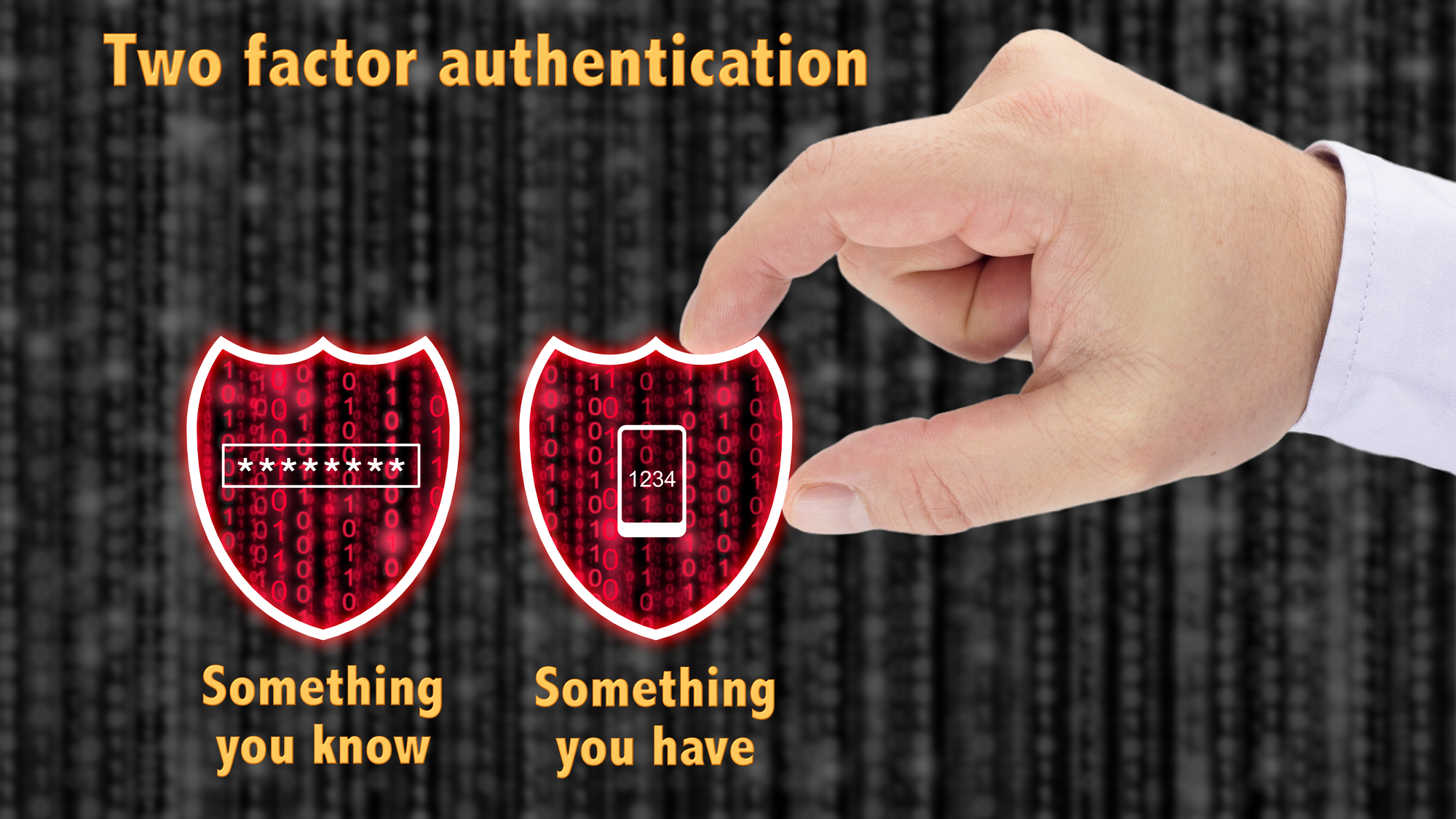
Two-Factor Authentication verifies a combination of two of the following things before granting access to your account:

Something you are (Fingerprint, retina, or facial scan)

Something you have (your mobile phone or encryption key)

Something you know (your password)

Proving that you have something (physical possession of your phone or encryption key) is accomplished by the software or website sending a text message, call, temporary code, or other one-time data to your mobile phone device or encryption key which includes that changes every time you try to access to your account. That data is then verified by the solution prior to granting access.

If you fail to enter the correct code you’ll be blocked from logging into the account, even if you entered the right password!

Proving that you are something includes the use of a biometric scanner in addition to entering your user name and password.  These “scanners” included fingerprint imaging on cellphones and laptops as well as cameras in these same devices used for facial scans.

Some solutions also use an authenticator app to provide the second factor of authentication for their particular software or solution.  Some of these solutions have their own branded apps, and others use third party apps like Google Authenticator.

At the end of the day, Two-Factor Authentication can protect your sensitive data because it enables an additional layer security that is difficult to mimic by increasing the security that guards your personal, financial, or other protected information.

As always, we are here to get you on the right path!

~Sanne

Phishing | Fixing Your Weakest Link: Employees

Alisanne Steele | Rabbit Hole Technology | Saturday, July 1, 2018 | blog

You can have every piece of security hardware in the books: firewallbackup disaster recovery device, anti-virus; but your employees will still be the biggest vulnerability in your organization when it comes to phishing attacks. How do you mitigate as much risk as possible?

  1. Create and Strictly Enforce a Password Policy: Passwords should be complex, randomly generated, and replaced regularly. In order to test the strength of your password go to this site. (This is a perfectly safe service sponsored by a password protection platform that tells you how long it would take a hacker to decode your password.) When creating a password policy, bear in mind that the most prevalent attacks are Dictionary attacks. Most people utilize real words for their passwords. Hackers will typically try all words before trying a brute force attack. Instead of words, use a combination of letters, numbers, and symbols. The longer the password, the stronger it is. While it’s difficult to remember passwords across different platforms, try not to repeat passwords. This will protect all other accounts in the event of a breach on one of your accounts.
  2. Train and Test Your Employees Regularly: Educate your employees on how they can spot a phishing attack [insert link to blog 2]. Then, utilize penetration testing (a safe phishing attack orchestrated by your IT company to see how employees respond) to see how well they do. If employees fall for phishing attempts, send them through training again. We recommend doing this on a quarterly basis to ensure that your employees stay on their toes, and you always provide education on the latest attacks.
  3. Create a Bring Your Own Device Policy and Protect all Mobile Phones: You can safeguard as much as humanly possible on your network, but your employees are all walking in with a cell phone. Are they allowed to get emails on these phones? What about gaining access to the network remotely? Cell phones create a big black hole in security without proper mobile device management and mobile security.
  4. Perform Software Updates Regularly: Make sure that your software is up-to-date with all the latest security patches. Holding off on updates means that you’re leaving yourself open to vulnerabilities that have been discovered and addressed.
  5. Invest in Security: Security is not something for cost savings. Home-based hardware is not sufficient, and you at the very least need a quality firewall and backup device. Invest in your employee’s training, ongoing security updates, and maintaining a full crisis/breach plan.


There are two things that aren’t going away in any business, employees and security threats. Make sure that you’ve taken care of everything you can to avoid falling victim.


As always, we are here to help!